Service Area Pages: How to Rank in Every City You Roof
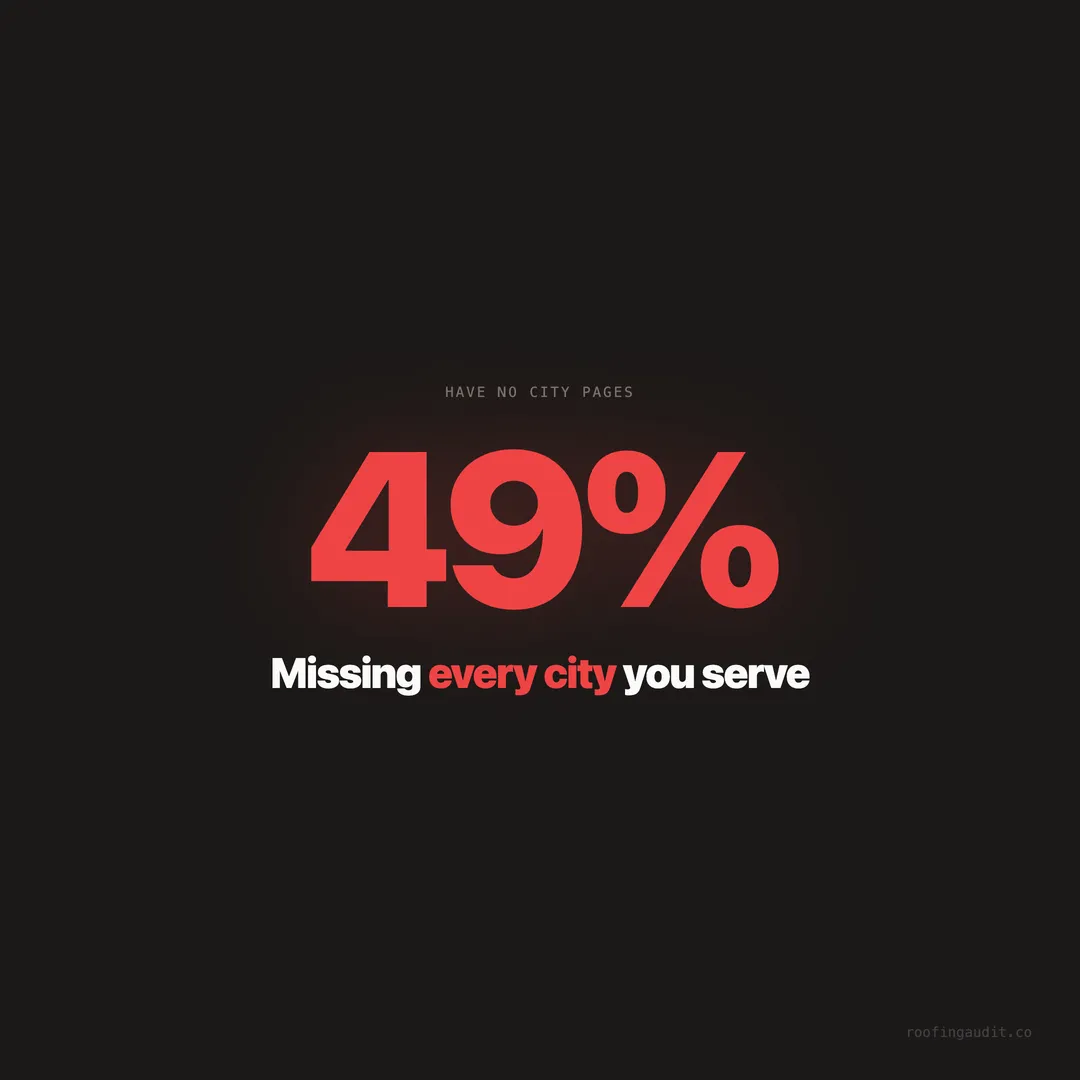
49% of roofing websites have no city-specific pages. We audited 1,409 sites and found the service area page formula that ranks in local search.
You roof homes in 12 cities. Your website mentions one. Google only knows about that one. The other 11 cities — cities where you drive to job sites every week, where you’ve replaced hundreds of roofs — might as well not exist to Google’s algorithm.
When we audited 1,409 roofing company websites across 121 cities in Texas, Florida, and Georgia, we found that 49% have no individual service area pages. Nearly half the roofing companies in the three largest roofing markets in America are invisible in every city except the one where their office sits.
This isn’t a minor SEO oversight. Google ranks pages, not websites. If you don’t have a page about roofing in Plano, you won’t rank for “roofer in Plano” — even if your truck is parked on a job site in Plano right now. The roofer who does have a Plano page gets the call. You drive past their yard sign on your way to a job you found the old way.
This post covers how to build service area pages that actually rank — not thin, templated pages that Google ignores, but real pages with local content that earn positions in local search.
Google Ranks Pages, Not Websites — This Changes Everything
Most roofers think of their website as a single entity. “My website ranks” or “my website doesn’t rank.” That’s not how Google works.
Google evaluates and ranks individual pages. Your homepage might rank for “roofer [your city].” Your roof repair page might rank for “roof repair [your city].” But neither of those pages will rank for searches in cities 20 miles away — not unless those cities are mentioned prominently on the page.
Here’s the problem. A homeowner in Frisco, Texas searches “roof replacement Frisco.” Google looks for pages that are specifically about roof replacement in Frisco. Your homepage, which says “serving the DFW metroplex,” doesn’t qualify. But your competitor’s dedicated “Roofing in Frisco” page does. They rank. They get the call. You don’t.
The roofing companies in our audit that rank in multiple cities have one thing in common: dedicated pages for each city they serve. Not a dropdown menu that filters the same content. Not a list of cities in the footer. Individual, unique pages.
What We Found: 49% of Roofing Sites Missing City Pages
The data from our audit of 1,409 roofing websites reveals how widespread this gap is.
49% of sites have zero individual service area pages. Their geographic presence online is limited to their homepage and maybe a contact page with an address.
22% of sites have some city pages — usually 2-5 for their closest cities — but not enough to cover their actual service area.
18% of sites have city pages but they’re thin — the same template with the city name swapped out, identical text, and no local-specific content. Google recognizes these as duplicate content and often ignores them entirely.
Only 11% of sites have comprehensive, unique service area pages for most or all of the cities they serve. These are the companies dominating local search across multiple markets.
The correlation between comprehensive service area pages and multi-city Map Pack appearances was one of the clearest signals in our entire dataset. The 11% with real city pages rank in an average of 3.2 times more cities than companies without them.
The Thin Page Problem: Why Templates Don’t Work
The most common mistake roofers make with service area pages is creating templates. They write one page about their roofing services, duplicate it 15 times, and swap out the city name. “Roof Replacement in Plano” becomes “Roof Replacement in Frisco” with identical text except for the city name.
Google’s algorithm is specifically designed to detect this. Duplicate content — or near-duplicate content with only a location name changed — is treated as low quality. Google may:
Index only one version. Google picks the “best” version (usually the first one it crawled) and ignores the rest. Your 15 pages count as 1.
Rank none of them. If Google determines the pages are thin and provide no unique value, it may choose not to rank any of them for local searches.
Penalize the site. In extreme cases, excessive thin pages can trigger a thin content penalty that impacts your entire site’s rankings — not just the duplicate pages.
We saw this pattern across our audit. Roofing companies with 10+ template city pages often ranked worse than companies with 3-5 unique city pages. More pages doesn’t mean more rankings. Better pages does.
What a Ranking Service Area Page Actually Contains
The service area pages that rank in our audit data share six characteristics. Here’s what each page needs.
1. City-specific opening. The first paragraph should mention the city by name, reference something specific to that area, and state what you do there. Not “We serve [City]” — more like “We’ve replaced over 200 roofs in Plano since 2012, from the established neighborhoods near Haggard Park to the newer developments west of the tollway.”
2. Local project examples. Photos and descriptions of roofs you’ve completed in that specific city. If you replaced a hail-damaged roof in a Plano neighborhood last month, that project belongs on your Plano page. Visual proof that you work there carries weight with both Google and homeowners.
3. City-specific reviews. If a customer in Plano left you a 5-star review mentioning their Plano neighborhood, display that review on your Plano page. City-specific social proof is the most persuasive element on a service area page.
4. Local storm and weather context. Texas and Florida cities have different storm profiles. A Plano page should mention North Texas hail season, the frequency of hail events in Collin County, and the specific types of roof damage common in the area. A Tampa page should mention hurricane season, wind-driven rain, and tropical storm preparedness.
5. Services available in that city. List every service you offer in that specific market. Roof replacement, roof repair, storm damage inspection, metal roofing, gutter installation, emergency tarping. Each service mentioned becomes a keyword Google can match to searcher intent.
6. Clear call to action with local phone number. “Call [number] for a free roof inspection in Plano” with a clickable phone number. Not a generic “contact us” — a specific, local call to action.
How Many Pages You Need — And the Order to Build Them
You don’t need to build 50 city pages at once. Start with the cities that generate the most revenue and expand from there.
Priority 1: Your office city. Your homepage or main service page may already cover this. Make sure it’s optimized with schema, reviews, and project photos.
Priority 2: Your top 3-5 revenue cities. The cities where you do the most jobs. These pages will have the most project photos and reviews available, making them easier to build with unique content.
Priority 3: Cities where competitors are weak. Look at the Google Map Pack for “roofer near me” in surrounding cities. If the top three results have fewer than 50 reviews and basic websites, that’s a market you can capture with a well-built page.
Priority 4: All remaining service area cities. Once you’ve established pages for your core markets, expand to every city you actively serve.
For a roofing company in the DFW metroplex, the typical build order looks like:
Phase 1: Dallas (home base) + Plano, Frisco, McKinney, Allen (top revenue cities) Phase 2: Richardson, Garland, Mesquite, Rowlett (adjacent cities) Phase 3: Denton, Lewisville, Carrollton, Flower Mound (expanded area) Phase 4: Fort Worth, Arlington, Grand Prairie, Irving (western expansion)
Each phase adds 4-5 pages. At one page per week, you can have comprehensive coverage in 4-5 months.
The Texas and Florida Opportunity
Our audit covered the three largest roofing markets in the United States. The service area page gap is especially pronounced in these states.
Texas (709 companies audited): The DFW metroplex alone has 50+ cities within typical roofing service range. Houston’s metro covers 40+ cities. San Antonio, Austin, and El Paso each have 15-20 surrounding cities. Yet 52% of Texas roofing companies have no city pages at all.
That means in a market like Plano — a city of 280,000 people with high home values and frequent hail damage — more than half the roofers who actually work there have no web presence for Plano-specific searches. The roofers who do have Plano pages face dramatically less competition than they would in Dallas proper.
Florida (531 companies audited): Tampa, Jacksonville, Orlando, and Miami each have sprawling metro areas. The Tampa Bay area alone covers Tampa, St. Petersburg, Clearwater, Brandon, Riverview, Lakeland, and a dozen more cities. 46% of Florida roofing companies have no individual city pages.
Florida has an additional advantage for service area pages: hurricane and storm content. Every Florida city has a different storm history. A roofing page for St. Petersburg can reference specific hurricanes, FEMA flood zones, and building code requirements that are unique to Pinellas County. This kind of hyper-local content is exactly what Google rewards.
Schema Markup for Service Area Pages
Each service area page should include its own schema markup — a JSON-LD block that tells Google this page is about roofing services in a specific city.
The schema for a service area page includes:
@type: RoofingContractor (same as your homepage)
areaServed: The specific city this page targets
name: Your business name
telephone: Your primary phone number
address: Your main business address
service descriptions: The specific services offered in that city
This schema reinforces the page’s geographic relevance to Google. Combined with on-page content that mentions the city, local project photos, and city-specific reviews, it creates a strong local signal that’s hard for competitors to match without doing the same work.
Content Ideas for Unique City Pages
The biggest challenge in building service area pages is making each one unique. You can’t write the same generic roofing content 15 times. Here are content angles that make each city page genuinely different.
Storm history. Every city has a different storm track record. Research hail events, hurricanes, tornadoes, or severe weather incidents specific to that city. “Plano recorded 47 hail events in the last 5 years” is a data point that belongs on your Plano page and nowhere else.
Building codes. Texas and Florida have different building code requirements by county and sometimes by city. Wind load requirements, permit processes, and inspection requirements vary. Mentioning these specifics shows genuine local knowledge.
Neighborhood references. Name specific neighborhoods, subdivisions, or landmarks. “From Legacy West to the established homes near Bob Woodruff Park” tells a Plano homeowner — and Google — that you know the area.
Local project case studies. “Last March, we replaced a hail-damaged roof on a 2,400 sq ft home in the Willow Bend neighborhood. The homeowner’s insurance covered the full GAF Timberline HDZ installation.” Real stories from real jobs in real neighborhoods.
Common roof types in that city. Newer suburbs might be dominated by architectural shingles. Older neighborhoods might have aging three-tab shingles or clay tiles. Coastal Florida cities have different materials than inland cities. These differences give each page unique, relevant content.
The pattern is clear: the pages that rank have genuine local content, not template text with a city name inserted. Google rewards the effort because homeowners reward the effort — they can tell the difference between a company that knows their city and one that’s just targeting a keyword.
Connecting Service Area Pages to Your Google Business Profile
Your service area pages and your Google Business Profile should work as a coordinated system.
GBP service area matches website pages. If your GBP lists 12 cities, your website should have pages for those same 12 cities. When Google sees the same geographic claims from both your GBP and your website, it has double the evidence to rank you in those cities.
City-specific Google Posts. When you complete a project in Plano, publish a Google Post about it on your GBP. “Just finished a full roof replacement in Plano — GAF Timberline HDZ, 50-year warranty.” Then add that same project to your Plano service area page. Both platforms reinforcing the same city signal.
Reviews mentioning cities. Encourage customers to mention their city in Google reviews. “Great experience — they replaced our roof in Frisco in just two days.” City mentions in reviews strengthen your relevance signal for that city’s searches.
Linking from GBP. Your GBP website link goes to your homepage. But in your GBP’s service descriptions, you can mention specific pages on your site. When someone navigates from your GBP to your website, they should find city pages that match what the GBP claims.
Measuring Service Area Page Performance
Once your city pages are live, track these metrics to measure their impact:
Search Console impressions by page. Google Search Console shows you which pages get impressions (appearances in search results) and clicks. Within 4-8 weeks of publishing a city page, you should see it generating impressions for “[service] [city]” searches.
Map Pack appearances. Search your target keyword in each city (using an incognito window or a location-specific search tool). Track whether you appear in the Map Pack for that city — this is the highest-value metric.
Phone calls by city. If you use a call tracking system, assign different tracking numbers to different city pages. This tells you exactly which cities are generating leads from your website.
Form submissions. Tag form submissions with the source page. If someone fills out a “Free Estimate” form on your Plano page, that’s a Plano lead generated by your service area strategy.
The typical timeline: new city pages begin generating search impressions within 4-8 weeks, start ranking in the top 20 within 2-4 months, and reach top 5 or Map Pack positions within 4-8 months — assuming the page content is unique, the GBP supports it, and reviews continue building.
The Compounding Effect of Multi-City Presence
Service area pages create a flywheel effect that compounds over time. Here’s how it works.
You build a Plano page. It starts ranking. A homeowner in Plano calls. You replace her roof. She leaves a Google review mentioning Plano. That review strengthens your Plano page’s relevance. The page ranks higher. Another Plano homeowner calls. The cycle repeats.
Meanwhile, you build a Frisco page. Same cycle starts. Each city page generates its own reviews, its own project photos, and its own local signals — all reinforcing your authority across the region.
After a year, you have 12 city pages, each with unique content, local project photos, and city-specific reviews. Your competitor — still relying on a single homepage that says “serving the metroplex” — is stuck competing for one city while you’re competing in 12.
The companies scoring above 80 in our Website Quality Index have an average of 8 service area pages. They rank in the Map Pack for an average of 4.2 cities. The average roofing website ranks in the Map Pack for 1.1 cities.
That’s not a small difference. That’s the difference between a local business and a regional powerhouse.
Start with your top 5 cities. Build one page per week. Use the 34-element checklist to ensure each page has the right trust signals and CTAs. And check how your market compares in our roofing market reports.
Keep Reading
Want to know your score?
Drop your URL — full report in 48 hours.
We're on it.
Report in your inbox within 48 hours.